SEO has its own language, and if you’re new to it, reading any blog, tool dashboard, or audit report can feel like decoding a foreign document. Terms like canonical URL, crawl budget, and E-E-A-T get thrown around constantly without explanation. That gap slows learning down fast.
This SEO glossary cuts through that. Every term below gets a plain-English definition, a quick example, and a note on why it matters. Whether you’re working through an SEO for beginners resource, exploring What is SEO for the first time, or figuring out how search engines work, knowing this vocabulary makes everything else click faster. Bookmark this page and come back to it as you go deeper into topics like On-Page SEO, Technical SEO, and Link Building.
Comprehensive Summary
Key Takeaways
New to SEO?
Learn it from scratch
Why understanding SEO terminology matters
Skipping vocabulary is the reason most beginners stall. You can follow a Keyword Research Guide step by step and still miss the point if you don’t know what search intent or CTR means in context.
Knowing the language helps in three ways: you learn faster because you’re not stopping to look things up mid-read, you communicate better with an SEO consultant or team, and you get more out of tools like Google Search Console and SEMrush. Every SEO Career Guide and SEO course assumes this foundation exists.
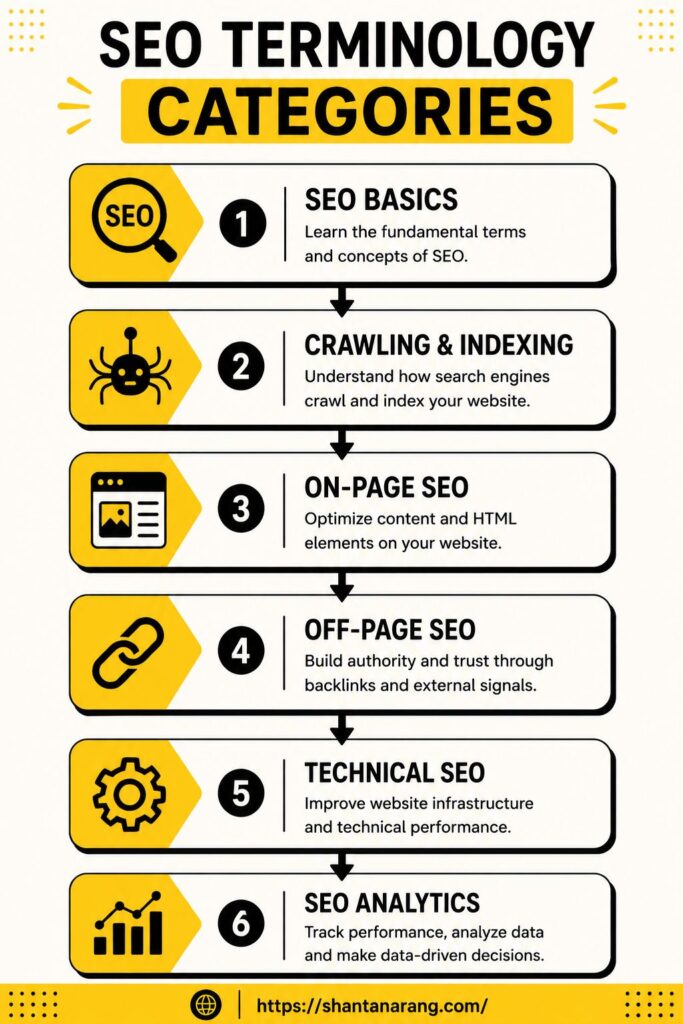
SEO basic terms
Start here before anything else. These show up everywhere.
SEO
Short for Search Engine Optimisation. The work you do to get pages ranking higher in Google without paying for ads. It covers content, site structure, and links, sometimes all three at once.
SERP
The page Google shows after you search for something. When people talk about “ranking,” they mean getting a visible spot on the SERP. Position one gets clicked far more than position five, even when both are on the same page.
Organic traffic
Visitors who found you through a search result, not a paid ad. It’s free in the sense that you’re not paying per click, though getting it usually takes real work.
Keyword
The word or phrase someone types into Google. “Best running shoes for flat feet” is a keyword. So is “running shoes.” They’re very different in terms of who’s searching and why.
Search intent
The actual goal behind a search. Someone typing “how to fix a leaky tap” wants instructions. Someone typing “plumber near me” wants to call someone. Same category, completely different intent. Getting this wrong means writing content that doesn’t match what the searcher wanted, so it won’t rank well regardless of quality.
Impression
Every time your page appears in search results, that’s one impression, even if nobody clicked it.
Click
When someone actually taps your result and lands on your page.
CTR
Click-through rate. The ratio of clicks to impressions. If your page got 1,000 impressions and 30 clicks, your CTR is 3%. A low CTR often means the title or description isn’t giving people a reason to click.
Want to know which keywords your site should target?
Most beginners skip keyword research and wonder why traffic never comes.
Crawling and indexing terms
Google can’t rank a page it hasn’t found and stored first. This is the stage that happens before rankings exist.
Googlebot
The automated program Google uses to browse the web. It follows links, reads pages, and brings the data back. Think of it as Google’s scout.
Crawling
What Googlebot does when it visits a page. It reads the content, follows the links on that page, and adds new URLs to its queue. Discovery happens here, nothing more.
Indexing
After crawling, Google decides whether the page is worth storing. If yes, it goes into the index. If not, it doesn’t show up in search at all. Crawled and indexed are not the same thing, which trips a lot of beginners up.
XML sitemap
A file that lists every page on your site. You submit it through Google Search Console so Googlebot doesn’t have to rely entirely on finding your pages through links. Useful, especially for new sites.
Robots.txt
A plain text file that sits at the root of your site and tells crawlers what they’re not allowed to visit. Blocking the wrong section accidentally is more common than most people realise.
Crawl budget
The number of pages Googlebot will crawl on your site within a set period. Small sites rarely need to worry about this. Large sites with thousands of pages do.
Canonical URL
When you have two URLs showing the same or very similar content, a canonical tag tells Google which one to treat as the real version. Without it, Google decides on its own, and that might not be the page you want ranking.
On-page SEO terms
On-Page SEO is everything within your control on the page itself.
Meta title
The headline that appears as a blue link in search results. Google reads this to understand what the page is about. Keep it under 60 characters or it gets cut off.
Meta description
The two lines of text under the title in search results. Doesn’t affect rankings directly, but a well-written one improves CTR.
Heading tags
H1, H2, H3 and so on. They structure the page for both readers and crawlers. Each page should have one H1. Everything else falls under it hierarchically.
URL slug
The end part of a URL. In yoursite.com/seo-glossary, the slug is /seo-glossary. Short, readable slugs with the target keyword tend to perform better than long strings of words or numbers.
Alt text
The description added to an image in the code. Screen readers use it for accessibility. Googlebot uses it because it can’t actually see images the way a person does.
Internal link
A link from one page on your site to another page on the same site. Good internal linking helps Googlebot discover pages and spreads authority across the site.
External link
A link pointing to a page on a different website. Linking out to credible sources can signal to Google that your content is researched rather than made up.
Anchor text
The words you click on when you click a link. Google reads anchor text to understand what the destination page covers. Vague anchor text like “click here” passes no useful context.
Keyword density
How often a keyword appears relative to the total word count. There’s no target percentage to hit. Write naturally; if a keyword fits, use it.
Image SEO
Optimising images so they load quickly and appear in image search. Involves file names, alt text, compression, and format choice.
Are your titles, headings, and meta descriptions set up correctly?
Small on-page fixes often make a bigger difference than publishing new content.
Off-page SEO terms
What happens on other websites still affects your rankings.
Backlink
A link from another site pointing to yours. One of the clearest signals Google uses to judge whether a page is worth ranking. Not all backlinks carry equal weight; a link from a well-regarded site in your industry matters more than one from a low-traffic directory.
Referring domain
A website that links to yours. One domain can send several backlinks. When tracking links, referring domains is often the more useful number.
Link Building
The process of getting other sites to link to yours. Some of it is outreach, some is creating content worth linking to. Link Building is one of the harder parts of SEO to do well.
Nofollow
An attribute on a link that tells Google not to pass ranking credit through it. Common on sponsored content, user-generated content, and certain editorial policies.
Dofollow
A standard link with no nofollow tag. Passes ranking credit. Most editorial links are dofollow by default.
Domain Authority
A score Moz created to estimate how well a domain might rank. Google doesn’t use it, but it’s a useful rough comparison when assessing link prospects.
Page Authority
The same concept as Domain Authority but applied to a single page.
Technical SEO terms
Technical SEO terms relate to the infrastructure of a site rather than the content sitting on it.
Structured data
Code added to a page that labels what different pieces of content are. Tells Google that a specific block of text is a review, a product price, or a recipe step. Without it, Google has to guess.
Schema markup
The coding vocabulary used to write structured data. Comes from Schema.org, a shared standard supported by Google, Bing, and Yahoo.
Core Web Vitals
Three metrics Google uses to measure page experience. LCP measures how fast the main content loads. INP measures how quickly the page responds to user input. CLS measures whether elements jump around while the page loads.
Mobile-first indexing
Google indexes and ranks based on the mobile version of a page, not the desktop version. If your mobile experience is broken or stripped down, that’s what Google evaluates.
HTTPS
The secure version of HTTP. Google confirmed it as a ranking signal years ago. Browsers also flag non-HTTPS sites as unsecure, which affects whether people trust the page enough to stay.
Page speed
How quickly a page loads for a user. Slow pages lose visitors before they’ve read anything and score poorly on Core Web Vitals.
Redirect
Sends a visitor and Googlebot from one URL to a different one. A 301 is permanent and passes most ranking credit. A 302 is temporary and doesn’t.
404 error
What a server returns when a page doesn’t exist. A handful of 404s is normal. A large number signals poor site maintenance and wastes crawl budget.
Canonicalization
The broader practice of managing duplicate URLs so Google knows which version to index and rank.
How strong is your backlink profile?
Find out where your site actually stands.
SEO analytics terms
These are the numbers you’ll read inside Google Search Console and Google Analytics once traffic starts arriving.
Google Search Console
A free Google tool. Shows which queries bring up your pages, how many clicks and impressions each page gets, which pages are indexed, and what errors need fixing. The first tool to set up on any new site.
Google Analytics
Tracks what visitors do after they land on your site. Where they came from, how long they stayed, which pages they visited, whether they converted.
Bounce rate
The percentage of sessions where someone visited one page and left without interacting further. A high bounce rate isn’t automatically bad; it depends on what the page was supposed to do.
Conversion rate
The percentage of visitors who completed a goal, a form submission, a purchase, a sign-up.
Sessions
A single visit. One person can generate multiple sessions if they visit on different days or after a session expires.
Users
Individual people who visited the site within a reporting period.
Average position
The average ranking position your page held in Google Search for a given query or set of queries. A number like 4.2 means your page usually appears around position four.
Clicks
Total number of times users clicked through to your site from search results.
Impressions
Total number of times your pages appeared in search results during the reporting period, clicked or not.
Common SEO acronyms
Acronym | Full meaning |
|---|
SEO | Search Engine Optimisation |
SERP | Search Engine Results Page |
CTR | Click-Through Rate |
DA | Domain Authority |
PA | Page Authority |
UX | User Experience |
UI | User Interface |
CMS | Content Management System |
NLP | Natural Language Processing |
E-E-A-T | Experience, Expertise, Authoritativeness, Trustworthiness |
Ready to stop guessing and start ranking?
Let's look at what's holding your site back.
Conclusion
None of these terms need to be memorised before you start. The point is knowing where to look when something comes up in a guide or tool and you’re not sure what it means. That’s what this SEO glossary is for.
From here, the SEO Foundations series covers each topic in more depth. If you’re mapping out what to learn next, an SEO Roadmap for Beginners is a good next step, as is going deeper into SEO Myths that slow people down early, or picking up an SEO course that walks through On-Page SEO and Technical SEO in sequence. Anyone considering work as an SEO consultant will find this vocabulary comes up constantly in client conversations and audits alike.
FAQ’s on SEO Terminology Guide
What is SEO terminology?
The collection of words, phrases, and SEO abbreviations that come up regularly in search engine optimisation work. Covers basic SEO terms like keyword and organic traffic through to more specific SEO vocabulary like canonicalization and Core Web Vitals.
Why should beginners learn SEO terms?
Because every guide, tool, and report assumes you know them. Without this base, reading an SEO course or audit output becomes slow and frustrating.
What is the difference between crawling and indexing?
Crawling is Googlebot visiting and reading a page. Indexing is Google deciding to store that page. Being crawled doesn’t mean being indexed.
What does SERP mean?
Search Engine Results Page. The page Google shows after you run a search.
What is a backlink?
A link from one website pointing to another. One of the main signals Google uses when deciding how to rank pages.
What is keyword intent?
The reason behind a search. Someone searching for a definition wants to learn. Someone searching for a price wants to buy. Intent shapes what kind of content belongs on a page.
What is a canonical URL?
The version of a page Google treats as the primary one when duplicates exist. Set through a canonical tag in the page’s code.
What is structured data?
Code added to a page that labels its content so Google can read it more precisely. Helps pages qualify for rich results on the SERP.
The broader practice of managing duplicate URLs so Google knows which version to index and rank.

 WhatsApp