Keyword Mapping Explained: What It Is and How to Do It

18/09/2026 12 min read SEO Shanta Narang

Fill the form to get started


    Summary: Keyword mapping is the process of assigning specific keywords to specific pages before you write anything. Without it, pages end up competing against each other, site structure becomes unclear, and content effort gets wasted on pages that were never going to rank.

    Most sites that struggle with SEO don’t have a content problem. They have a structure problem. Pages go live targeting similar topics with no clear assignment of which page should rank for which query. Six months later, traffic is flat, two pages are quietly competing against each other for the same term, and nobody knows why rankings aren’t moving.

    Keyword mapping is what prevents that. It is the step that sits between keyword research and content creation, where you decide which page owns which keyword before any writing starts. Done properly, it gives every URL on the site a defined purpose, a clear intent match, and no internal competition. Skipped entirely, you end up with a site full of pages guessing at the same queries and splitting whatever ranking signals they earn.

    This guide covers what is keyword mapping, why it matters, how to build one from scratch, and what a properly mapped page actually looks like using a real example.

    Key Takeaways

    • Keyword mapping assigns one primary keyword per page so every URL has a clear target and no two pages fight for the same query

    • Skipping keyword mapping is the most common cause of keyword cannibalization, where your own pages quietly undercut each other in search rankings

    • A keyword mapping template turns your keyword research output into an organised, actionable structure before a single page goes live

    Comprehensive Summary

    • Keyword mapping: Keyword mapping connects each page on a site to a specific keyword so every URL has a defined purpose and a realistic shot at ranking.

    • Keyword cannibalization: When two or more pages target the same keyword, they split ranking signals instead of concentrating them, and Google often ranks neither page well.

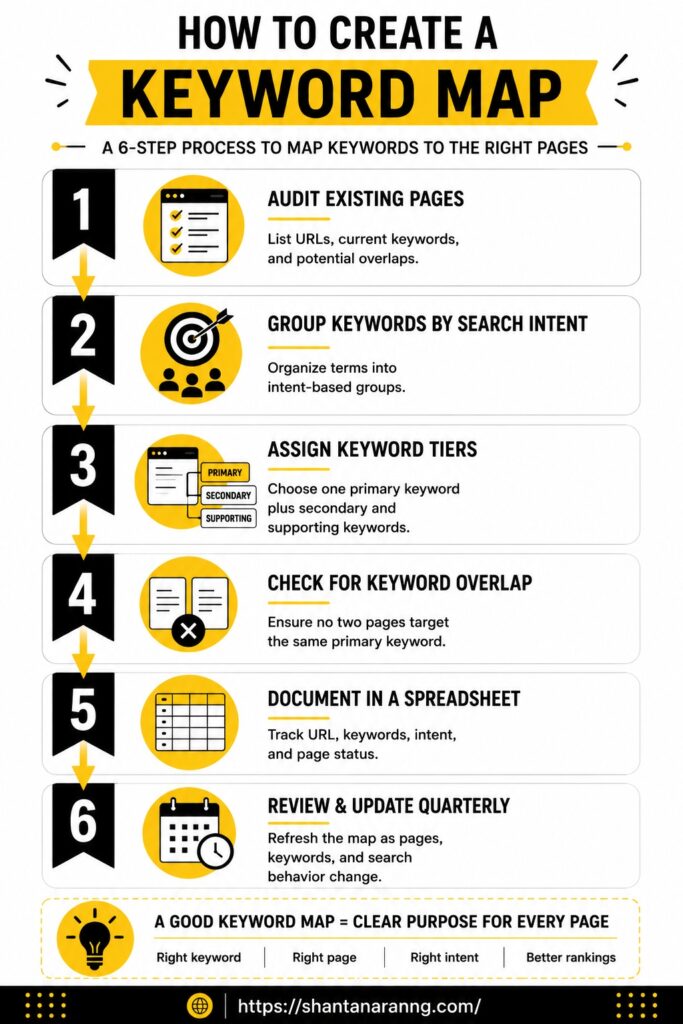
    • The mapping process: Mapping follows a repeatable sequence: audit existing pages, group keywords by intent, assign primary and secondary keywords, check for overlap, and document everything in a spreadsheet.

    • Keyword mapping template: A keyword mapping template is a structured spreadsheet that tracks URL, primary keyword, secondary keywords, search intent, and page status in one place.

    • Mapping by page type: Different page types, blog posts, service pages, and course pages, need different keyword tiers assigned to them based on the intent behind the queries they target.

    • Maintaining your map: A keyword map is a living document that needs reviewing quarterly as new pages get added, old ones retire, and search behaviour shifts.

    Not sure if your site has a structure problem?

    What Is Keyword Mapping?

    Keyword mapping is the process of assigning specific keywords to specific pages on a website based on search intent, so each URL targets a distinct query and no two pages compete for the same term.

    Think of it as a keyword research guide translated into a site plan. Instead of a list of keywords sitting in a spreadsheet with nowhere to go, each one gets a home. One page, one primary keyword, one clear purpose.

    A keyword map covers every live page and every planned page. It records what keyword each URL is built around, what secondary terms support it, what intent the page serves, and whether the page exists yet or is still in planning.

    Why Keyword Mapping Matters

    Most beginners go straight from building a keyword list to writing content. Keyword mapping for seo sits in between those two steps and does the work that makes the content worth publishing.

    • Prevents keyword cannibalization before it starts, rather than diagnosing it months after pages go live

    • Makes site structure visible so you can see content gaps, overlapping pages, and missing topics at a glance

    • Strengthens internal linking because related pages are already grouped and their relationships are clear

    • Builds topical authority by showing which clusters of content cover a topic fully and where depth is missing

    • Removes guesswork from content planning since every new page has a defined keyword target before the brief gets written

    Keyword Cannibalization: What It Is and Why It Happens

    Keyword cannibalization is when two or more pages on the same site target the same primary keyword. Instead of one strong page ranking well, both compete and split the ranking signals that should sit in one place. Google often ranks the wrong page, or neither page consistently.

    A Real Example

    A site publishes a blog post titled “How to Do Keyword Research.” Later, a service page titled “Keyword Research Services” goes live also targeting “keyword research” in its title tag and H1. Now both pages chase the same query:

    • The blog post ranks some days, the service page on others

    • Neither builds consistent authority because the signals keep dividing

    • Google decides which page to surface, and it rarely picks the right one

    Why It Keeps Happening

    Cannibalization is almost always a planning problem, not a content problem:

    • A second page gets published without checking what keywords are already assigned

    • Nobody has a keyword map to reference before the brief gets written

    • Related pages grow over time and slowly drift into the same keyword territory

    A keyword map prevents this by documenting every assignment upfront. Before any page goes live, the check is already built into the process.

    New to SEO structure?

    Learn the basics first

    The Keyword Mapping Process: Step by Step

    The Keyword Mapping Process: Step by Step

    This is a repeatable process that works whether you are mapping a brand new site or auditing an existing one with content already live. Go through the steps in order.

    Step 1: Audit existing pages

    Before assigning anything, know what you are working with.

    • List every live URL on the site and note what keyword, if any, each one currently targets

    • Flag pages with no clear keyword focus. These are the highest priority for mapping

    • Note pages that appear to be covering similar topics. These are potential cannibalization problems

    • For a new site with no live pages yet, replace this step with a list of all planned pages

    The audit does not need to be exhaustive on the first pass. The goal is a clear inventory, not a deep technical review.

    Step 2: Group keywords by search intent

    Take your keyword research output and sort every term by what the searcher actually wants.

    The four types of search intent categories: informational (to learn), navigational (to reach a specific page), commercial (to compare options), transactional (to take an action).

    This is the step most beginners skip entirely, and it is the main reason keyword cannibalization happens. Two pages targeting the same keyword but built for different intents will always compete. Grouping by intent first makes the correct page assignment obvious.

    Check the search intent guide for how to identify intent for any keyword in under five minutes.

    Step 3: Assign primary, secondary, and supporting keywords per page

    Every page gets three tiers of keywords:

    • Primary keyword: the one term the page is built around. Goes in the H1, title tag, meta description, and URL where possible. One per page, no exceptions.

    • Secondary keywords: close variations covering how different people phrase the same need. Used in H2s and naturally throughout body copy. Aim for 2 to 4 per page.

    • Supporting keywords: longer-tail, more specific phrasings woven into body copy, FAQ sections, and alt text. These are not forced into headings. They fill in the depth around the primary topic.

    This three-tier system is what separates a keyword map from a simple keyword list. Every page has a hierarchy, not just a target.

    Step 4: Check for overlap

    Before locking in any assignments, compare every page’s primary keyword against every other page.

    • No two pages should share a primary keyword

    • If two pages are competing for the same term, decide which one owns it and either adjust or merge the other

    • Secondary keywords can appear on multiple pages but should not be the primary focus of more than one

    This check is faster with a spreadsheet because you can sort the primary keyword column and spot duplicates immediately.

    Step 5: Document in a spreadsheet

    The keyword map lives in a spreadsheet. Minimum columns needed:

    • URL (live or planned)

    • Primary keyword

    • Secondary keywords

    • Supporting keywords

    • Search intent (informational, commercial, transactional, navigational)

    • Status (published, planned, needs update, under review)

    This is what the free keyword mapping template below is built for. The document becomes the single source of truth for every content and SEO decision on the site.

    Step 6: Review and update quarterly

    Search behaviour shifts. New pages get added. Old ones get retired or merged. A keyword map built in January will be outdated by April if nobody maintains it.

    Schedule a quarterly review to check for:

    • New pages published without a keyword assignment

    • Terms that have dropped off the target keyword list

    • Cannibalization created by new content added since the last review

    • Gaps where clusters are thin and need new supporting pages

    The map is a living document, not a one-time deliverable.

    Keyword Mapping by Page Type

    Not every page gets mapped the same way. The keyword tier system applies differently depending on what the page is trying to do.

    Here is a real example from shantanaranng.com showing how a single course page gets mapped across three keyword tiers:

    Tier Keyword Placement
    Primary advanced SEO course 1 on 1 H1, title tag, URL, meta description
    Secondary personalised SEO training H2, body copy
    Secondary one on one SEO coaching H2, body copy
    Supporting SEO mentorship for beginners Body copy, FAQ
    Supporting learn SEO with expert guidance Body copy, alt text
    Supporting SEO course with personal feedback FAQ, body copy

    Notice this is not six separate pages. It is one page mapped to six semantically related keywords across three tiers, all sharing the same core intent: personalised, one-on-one SEO training. That is what correct keyword mapping looks like in practice. One strong page covering a topic deeply beats six thin pages each chasing a single variation.

    This is also where keyword clustering and keyword mapping overlap. Clustering groups related keywords together. Mapping assigns that cluster to a specific URL and defines which keyword leads.

    Not sure what keywords to map?

    Maintaining Your Keyword Map Over Time

    A keyword map that gets built once and never touched stops being useful within a few months.

    • Review the map quarterly and check every page added since the last review has a keyword assignment

    • When publishing new content, always check the map first to confirm the target keyword is not already assigned to another page

    • Retire keyword targets for pages that have been merged, deleted, or significantly redirected

    • Add new keyword opportunities discovered through Google Search Console queries that are already generating impressions

    • Flag underperforming pages where the assigned keyword may need to change based on ranking data

    The map is most useful when it reflects the site as it actually exists, not as it was planned six months ago.

    Conclusion

    Keyword mapping is what turns a pile of keyword research into an actual site structure. Without it, content gets published based on instinct, pages drift into competing for the same queries, and the site never builds the kind of topical authority that drives consistent rankings.

    With a map in place, every page has a target, every keyword has a home, and the relationship between pages becomes visible. Internal linking decisions become obvious. Content gaps show up before they become months of missed traffic. And keyword cannibalization gets caught at the planning stage instead of the diagnosis stage.

    For anyone working through SEO for beginners or managing a site that has grown without a clear structure, building a keyword map is the single step that brings the most clarity the fastest. Start with the pages you already have, assign keywords where they are missing, check for overlap, and document everything. The structure follows from there.

    FAQ’s on Keyword Mapping in SEO

    What is keyword mapping in SEO?

    Keyword mapping is the process of assigning specific keywords to specific pages on a website so every URL has a clear target, serves a defined search intent, and no two pages compete for the same query.

    What is keyword cannibalization?

    Keyword cannibalization happens when two or more pages on the same site target the same primary keyword, splitting ranking signals between them and preventing either page from building consistent authority.

    How do I create a keyword map?

    Audit your existing pages, group your keywords by search intent, assign one primary keyword and a set of secondary and supporting keywords to each page, check for overlap across pages, and document everything in a spreadsheet. The free template above is built for exactly this.

    Can one page target multiple keywords?

    Yes, and it should. One primary keyword leads, with 2 to 4 secondary keywords covering close variations and several supporting long-tail terms woven naturally into the body copy. What a page should never do is target two different primary keywords competing for different intents.

    How often should I update my keyword map?

    Quarterly is the practical minimum. Any time a new page gets published or an old one gets significantly changed, the map should be updated at the same time to keep it accurate.

    ABOUT AUTHOR

    Shanta Narang Picture

    Shanta Narang

    Shanta Narang is an SEO consultant and digital marketing specialist with over 15 years of experience helping brands build strong online visibility. As an SEO expert in India, she focuses on delivering structured SEO services, content writing services and user-focused digital strategies.

    contact@shantanarang.com

    Recent Posts

    whatsapp icon WhatsApp