
Your SEO traffic isn’t converting into leads. You get visitors every day, but nobody’s calling, filling out forms or making purchases. They’re silently draining your growth potential while your competitors continue to convert attention into revenue.
The gap between what you declared and what Google selected is where most duplicate content SEO problems live. Closing that gap requires knowing which signals Google actually weighs and where site structures tend to produce the loudest contradictions.
Key Takeaway
- Google treats the rel canonical tag as one signal among 40 plus, not a binding instruction, and will override it when other signals disagree.
- Duplicate content SEO problems left unresolved break link equity across multiple URLs and inflate index bloat across the site.
- Matching your canonical tag with your internal linking strategy, XML sitemap, and HTTPS setup gives Google a consistent, unambiguous signal to follow.
Struggling with Duplicate Content
and Indexing Issues
and Indexing Issues
Get a free audit
Fill the form to get in touch.
Comprehensive Summary
- Canonicalization: When two pages return the same content, Google picks one URL to rank and buries the rest. That selection process is canonicalization, and your tag is only one input into it.
- Canonical URL: The URL Google selects as canonical gets all the link equity. Every duplicate version in the cluster feeds into it rather than competing against it.
- Duplicate Content SEO: Split signals across multiple URLs and no single version ranks with full strength. Google cannot consolidate what the site itself has scattered.
- Rel Canonical: The tag tells Google your preferred URL. Whether Google agrees depends on what your internal links, sitemap, and backlink profile are saying at the same time.
- Crawl Budget Optimization: Googlebot crawls duplicate URLs the same way it crawls everything else, which means parameter variants and legacy paths eat into the crawl allocation meant for pages that actually need to be discovered.
- Google Selected Canonical: When Search Console surfaces a Google-selected canonical that differs from yours, another part of your site sent a louder signal than the tag did.
What is Canonicalization in SEO?
Canonicalization is the process Google runs to select one URL for indexing when two or more pages return the same or near-identical content. It is a foundational part of understanding search engine optimization at a technical level, and sites that get it wrong typically see fragmented rankings, crawl waste, and index bloat without a clear cause.
What is a Canonical URL?
A canonical URL is the version of a page Google designates as the master copy when duplicates exist across the site.
- Every duplicate version feeds its link equity and crawl signals back to this URL
- Google returns this URL in search results, not the duplicate versions
- Site owners can declare it through a rel canonical tag, or Google selects it based on its own signal evaluation
Why Canonicalization Matters for SEO
When the same content lives at multiple URLs without a declared canonical, ranking signals scatter rather than stack.
- Link equity fragments across the canonical and its duplicates rather than consolidating on one page
- Crawl budget drains on pages that carry no ranking value
- A parameter-based or filtered URL can appear in search results instead of the clean page
- New pages take longer to get discovered because Googlebot is spending crawl allocation on duplicate versions
How Google Handles Duplicate Content
Google does not penalise duplicate content in most cases. It selects one version and removes the rest from ranking consideration.
- Duplicate pages get grouped into clusters based on content similarity
- One URL per cluster gets selected as the canonical and receives indexing priority
- The remaining cluster URLs may still be crawled but are excluded from ranking
- When signals across a cluster contradict each other, none of the versions rank with full strength
How Google Determines the Canonical URL
Before Google selects a canonical, it has already looked at where internal links point, which URLs the sitemap lists, how backlinks are distributed, how deep the content runs, and which version serves HTTPS. The tag sits in that queue alongside everything else.
User-Declared Canonical vs Google-Selected Canonical
These are two separate things, and Search Console surfaces both of them.
- User-declared canonical: The URL you put in the rel canonical tag, the version you want Google to treat as the original.
- Google-selected canonical: The URL Google actually indexed, visible under Indexing > Page Indexing in Search Console.
When both show the same URL, the site’s signals are aligned and canonicalization is doing its job and when they show different URLs, something else on the site, internal links, sitemap entries, or backlink patterns, spoke louder than the tag. That gap between declared and selected is where most duplicate content problems sit, and closing it starts with auditing what the rest of the site is pointing toward.
Google Choosing a Different Canonical URL?
Book an SEO Consultation
Fill the form to get in touch.
Why Google Sometimes Ignores Canonical Tags
Google sets aside a canonical tag when the structural signals across the site contradict it.
- Internal links across the site point to a different URL than the one the canonical tag declares, and Google reads link patterns as harder evidence than a single HTML attribute.
- The XML sitemap lists a competing URL for the same content, putting two different preferred versions on record at the same time.
- The declared canonical has less content depth or a weaker backlink count than an untagged duplicate sitting on the same site. Google picks the stronger page. The tag on the weaker one gets ignored.
- The canonical target returns a redirect or an error code. Google will not designate an unstable URL as the preferred version, so it selects a different one without notifying you.
- Two canonical tags land on the same page, which happens when a CMS plugin and a theme both output their own tag. Google receives two different instructions and follows neither.
How Google Evaluates Duplicate Pages
Google runs content similarity checks alongside structural signal evaluation before grouping pages as duplicates.
- Pages sharing 80 to 90 percent or more of their body text get clustered together
- The URL with the strongest combined signal profile across links, engagement, and structure gets selected
- Structural signals include HTTPS status, internal link frequency, and whether the URL appears in the sitemap
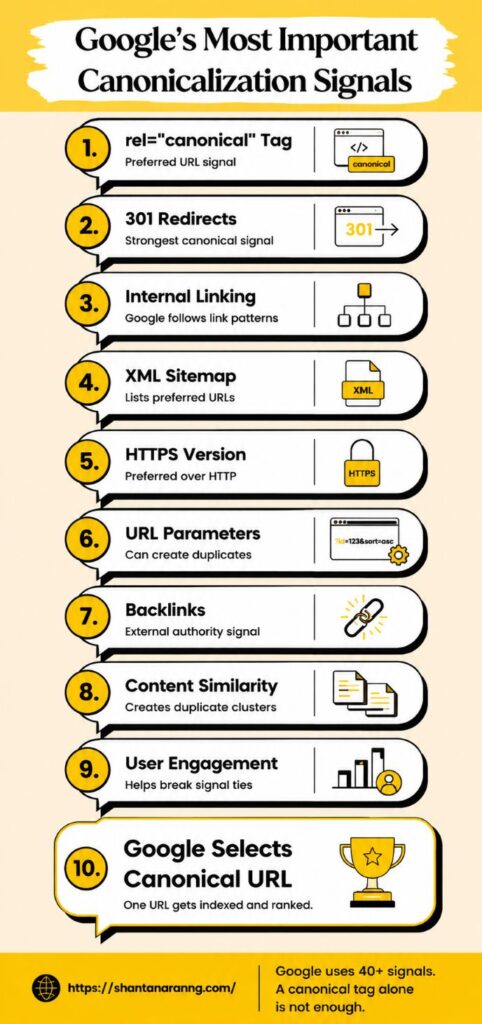
Google's Most Important Canonicalization Signals
Google has confirmed it uses approximately 40 signals to determine the canonical URL. According to Search Engine Journal’s coverage of Google’s own documentation, the signals below carry the most weight in practice.
rel="canonical" Tags
The rel canonical tag placed in the HTML head section is the most direct canonicalization signal a site owner controls.
In html:
<link rel=”canonical” href=”https://www.example.com/preferred-page/” />
Place it inside the <head> section on every page, including a self-referencing tag on the canonical page itself
Use absolute URLs only, never relative paths
Two or more canonical tags on a single page cause Google to discard all of them
301 Redirects
A 301 redirect carries stronger canonical weight than a tag because it physically moves traffic and transfers close to 100 percent of link equity to the destination.
- Use 301 redirects when permanently retiring a URL
- Redirect chains weaken signal transfer; collapse A to B to C into a direct A to C redirect
- Google treats the final destination of a 301 redirect as the canonical version of that URL
Internal Linking Signals
The URL your own pages link to most frequently sends a canonical signal that can outweigh the tag itself.
- Every internal link across the site should point to the canonical version, not HTTP variants, parameter URLs, or legacy paths
- A consistent internal linking strategy across navigation, breadcrumbs, and body content reinforces which URL Google should select
- Screaming Frog and Ahrefs both surface internal links pointing to deprecated or non-canonical URLs during a full site crawl
XML Sitemaps
Google treats URLs listed in a sitemap as canonical candidates, so what goes into the sitemap carries real weight.
- List only canonical URLs in your XML sitemap
- Remove parameter variants, session IDs, and faceted navigation URLs from the sitemap entirely
- Every sitemap URL must match its corresponding canonical tag exactly, including protocol, subdomain, and trailing slash
HTTPS vs HTTP
Run both protocol versions of a page without a redirect and Google will pick the HTTPS version as canonical. That much is predictable. What catches sites off guard is leaving internal links and canonical tags still referencing HTTP after the migration, which puts contradicting signals back into the same setup that was just cleaned up.
- Set up 301 redirects from every HTTP URL to its HTTPS equivalent across the full site, not just the homepage.
- Audit internal links after the redirect implementation and update any still pointing to HTTP versions.
- Every canonical tag across every page template must reference the HTTPS URL, not the HTTP version the site used before migration.
URL Parameters
Parameters appended for tracking, filtering, or sorting create duplicate pages at volume, particularly on e-commerce sites.
- Apply canonical tags on parameter URLs pointing back to the clean base URL
- Use the URL Parameters tool in Google Search Console to flag parameters that produce no new content
- Block pure tracking parameters in robots.txt only where canonical tags are not sufficient
Backlinks and External Signals
The URL version that receives the most external links sends a strong canonical signal as part of the site’s off-page SEO signals profile.
- The URL attracting the highest backlink volume receives stronger external canonical weight
- Equity from links pointing to non-canonical versions consolidates onto the canonical once signals are aligned
- Before declaring a canonical on a high-traffic page, check which URL version carries the most backlinks in Ahrefs
Content Similarity Signals
Text similarity analysis is the mechanism Google uses to group pages into duplicate clusters.
- Pages built through programmatic SEO need substantive content differences to avoid being clustered as duplicates
- Faceted navigation pages on large e-commerce sites are among the most frequent sources of unintentional duplication
- Thin campaign or tracking variants should carry canonical tags pointing to the base URL from day one
User Engagement Signals
Where structural signals are ambiguous, Google uses engagement data to break the tie between competing URLs.
- Pages with consistent organic click history carry more canonical weight than versions with no impressions
- A URL with zero historical clicks is at a disadvantage against a competing version that has been indexed and clicked before
Unsure Whether Your Canonical Tags Are Working?
Common Canonicalization Issues in Technical SEO
Duplicate Without User-Selected Canonical
Google found duplicate pages but received no canonical tag pointing to a preferred version. Google made its own selection.
- This is the most frequently flagged canonicalization status in Search Console
- The URL Google selected may not be the one you want ranking
- Add rel canonical tags to all duplicate versions pointing to the preferred page
- Start with URLs that already generate organic impressions before moving to lower-traffic pages
Google Chose Different Canonical Than User
Your canonical tag was overridden. Search Console shows a Google-selected canonical that does not match your declared one.
- Check whether internal links across the site consistently reference the canonical URL you declared
- Verify the sitemap does not list a competing URL version for the same page
- Confirm the declared canonical returns a 200 status code and is not blocked in robots.txt
- Pull backlink data in Ahrefs: if most links point to a different URL format, Google may be following that signal instead
Canonical Chains and Loops
A canonical chain occurs when Page A canonicalises to Page B, which canonicalises to Page C. A loop occurs when the chain eventually circles back to Page A.
- Screaming Frog's Canonicals report identifies both chain and loop patterns across a full site crawl
- Fix chains by pointing all duplicate URLs directly to the final canonical, cutting out intermediate hops
- Each extra hop in a chain reduces the strength of the signal reaching the final canonical
Pagination Issues
Canonicalising all paginated pages (page 2, page 3) to page 1 tells Google those paginated pages are duplicates of the first page.
- Every paginated page should carry a self-referencing canonical tag
- Google's current guidance is to let Googlebot discover paginated content through internal links without forcing a canonical to page 1
- Do not point paginated pages to the root category URL as a canonical
Parameter URLs
Parameter-driven URLs produce large volumes of duplicate content, particularly on sites with sorting and filtering functionality.
| Parameter Type | Example | Recommended Action |
|---|---|---|
| Tracking | ?utm_source=email | Canonical to clean URL |
| Sorting | ?sort=price_asc | Canonical to category page |
| Filtering | ?color=red | Canonical or configure in GSC |
| Session ID | ?sessionid=abc123 | Block in robots.txt |
| Pagination | ?page=2 | Self-canonical each page |
HTTP vs HTTPS Conflicts
Every HTTP page accessible without a redirect creates a duplicate pair alongside its HTTPS version.
- Set up site-wide 301 redirects from HTTP to HTTPS
- Update canonical tags to reference HTTPS URLs across all page templates
- Run a crawl after implementation to catch any internal links still using HTTP
Mobile vs Desktop URL Conflicts
Sites that run separate mobile URLs (m.example.com) next to their desktop versions create a duplicate pair for every page on the site unless both versions are explicitly annotated.
- The desktop page needs a rel alternate tag pointing to its mobile counterpart so Google knows the two are connected rather than competing.
- The mobile page needs a rel canonical pointing back to the desktop version so Google knows which one to rank.
- Responsive design sidesteps this entirely because one URL serves all devices, leaving no duplicate to annotate.
Why Google Ignores Canonical Tags Sometimes
Weak Internal Linking
When internal links across the site predominantly reference a different URL than the declared canonical, Google reads the link pattern as a more reliable signal.
- Run a full crawl and export pages where internal links point to non-canonical URLs
- Update those links before expecting Google to align with the canonical tag
Conflicting SEO Signals
When the sitemap URL, internal links, canonical tag, and backlink profile each reference a different URL version, Google cannot identify a clear preferred version.
- Audit all four signal sources together rather than fixing them in isolation
- Start with internal links because they appear at the highest frequency across the site and are the most straightforward to update
Poor Redirect Handling
Redirect chains, 302 redirects used in place of 301s, and broken redirect paths all reduce how cleanly the canonical signal reaches its target.
- Replace 302 redirects with 301 redirects wherever the move is permanent
- Collapse multi-hop redirect chains into single-hop redirects
- Set up automated crawl monitoring to catch new redirect problems as they appear
Thin or Duplicate Content
If the declared canonical carries substantially less content than a competing version, Google may select the stronger page as canonical regardless of the tag.
- The canonical page should be the most complete version of the content, not a stripped template
- Audit the content depth of canonical targets against whichever versions Google is currently selecting instead
Incorrect Canonical Implementation
Implementation errors appear often and silently until a Search Console audit surfaces them.
- Canonical tag placed in the body section rather than the <head>
- Relative URL used in the canonical tag instead of an absolute URL
- Multiple canonical tags on the same page, frequently caused by a CMS plugin and a theme both generating tags independently
- Canonical tag in the HTTP header pointing to a different URL than the one in the HTML
Best Practices for Canonical Tags
Use Absolute URLs
Every canonical tag must contain the full URL including protocol and domain
- Correct: <link rel="canonical" href="https://www.example.com/page/" />
- Incorrect: <link rel="canonical" href="/page/" />
Keep Canonical URLs Indexable
A canonical URL blocked in robots.txt or sitting behind an error code tells Google the declared preferred page is inaccessible, which defeats the tag entirely.
- After every site crawl, cross-check canonical targets against robots.txt to catch any that got blocked unintentionally.
- In Search Console, configure alerts for canonical URLs returning non-200 status codes so errors surface before the next scheduled audit.
Avoid Multiple Canonical Tags
Two canonical tags on one page cancel each other out, and Google does not pick between them. It drops both.
- Check CMS templates and SEO plugins separately, as both can generate a canonical tag without the other knowing
- Open the page source and search for "canonical" to see how many tags are actually rendering before assuming your setup is clean
Match Sitemap URLs
Every URL in your sitemap and its corresponding canonical tag need to be identical, same protocol, same subdomain, same trailing slash treatment.
A sitemap entry reading www.example.com/page/ paired with a canonical tag referencing example.com/page/ puts two different URLs on record for the same page. Google receives both and has to choose between them, which is exactly the kind of contradiction that produces a Google-selected canonical you did not intend.
Maintain Consistent Internal Linking
Internal links are the most frequently repeated canonical signal across any site, and consistency across every link carries more weight than any single tag.
- Set a site-wide URL format standard covering trailing slash, www vs non-www, and HTTPS
- Apply that standard to every internal link, navigation item, and breadcrumb trail across the site
Canonicalization vs Redirects
When to Use Canonical Tags
Use rel canonical when the duplicate URL needs to remain accessible to users.
- Filtered product pages that share content with the base category page
- Syndicated content published across multiple domains
- Print-friendly page versions that need to stay live
When to Use 301 Redirects
Use a 301 redirect when a URL is permanently retired and should never receive direct traffic again.
- Old URLs after a site migration
- Pages being merged into a single consolidated page
- Every HTTP to HTTPS transition across the site
Canonical Tags vs Noindex
Canonical tags and noindex serve different purposes. Using one in place of the other produces unintended outcomes.
| Signal | Crawling | Indexing | Link Equity |
|---|---|---|---|
| rel canonical | Page still crawled | Duplicate suppressed | Passed to canonical |
| 301 Redirect | Old URL not crawled | Old URL removed | Passed to destination |
| Noindex | Page still crawled | Removed from index | Not passed |
| robots.txt disallow | Page not crawled | May stay indexed | Not passed |
Learn Technical SEO the Right Way
How to Audit Canonicalization Issues
Using Google Search Console
The Page Indexing report is the correct starting point for a canonicalization audit.
- Go to Indexing > Pages in Search Console
- Filter for "Duplicate without user-selected canonical" and "Google chose different canonical than user"
- Export both lists and compare the Google-selected canonical against your declared tag for each affected URL
- Use the URL Inspection tool on specific pages to see exactly which canonical Google recorded on its last crawl
Using Ahrefs or Screaming Frog
Crawl tools surface canonicalization patterns across every URL simultaneously rather than page by page.
Screaming Frog:
- Run a full crawl and open Directives > Canonicals
- Filter for "Non-Indexable Canonical" to find canonical tags targeting blocked or redirecting pages
- Filter for "Canonical Chain" to locate multi-hop canonical paths
- Cross-reference canonical targets against the internal links report to spot contradictions
Ahrefs Site Audit:
- Open the Duplicate Content and Canonicalisation issue categories after running a full audit
- Export pages where Ahrefs detected a mismatch between canonical tags and internal link destinations
Checking Index Coverage Reports
The Index Coverage report shows how many pages Google excluded and the reason behind each exclusion.
- A high ratio of excluded pages to indexed pages points toward a large-scale duplicate or parameter problem
- Canonicalization-related exclusion statuses confirm Google is encountering duplicates without sufficient guidance
Finding Duplicate URLs
Content hash detection in Screaming Frog combined with the URL Inspection tool in Search Console identifies which pages Google groups as near-duplicates.
- Screaming Frog flags pages with identical title tags and meta descriptions as a starting proxy for duplication
- The URL Inspection tool returns the Google-selected canonical for any specific URL on request
Technical SEO Tips to Improve Crawl Efficiency
Crawl budget optimization is a direct output of clean canonicalization. Every duplicate URL in the index is a crawl request that does not go toward a page with actual ranking potential.
Improve Site Structure
A well-organized architecture cuts down how many separate paths lead to the same content.
- Build content into shallow category hierarchies that do not bury pages behind multiple navigation layers
- Remove overlapping navigation paths, tag archive pages, and cross-linked category pages that produce multiple routes to the same URL
- Add structured data breadcrumbs to reinforce the canonical path to each page
Reduce Duplicate Pages
Fewer URLs in the index means more crawl capacity available for pages that carry ranking value.
- Audit faceted navigation and block or canonicalise parameter combinations that return no unique content
- Consolidate thin pages produced through programmatic SEO into fewer pages with more substantive content
- Redirect or remove outdated pages that no longer serve a purpose in the current site architecture
Optimize Internal Links
Internal links are both a canonicalization signal and the primary route through which Googlebot discovers new pages.
- Remove internal links pointing to redirected, canonicalised, or non-indexable URLs
- Point internal links from high-authority sections of the site toward high-priority pages
- An internal linking strategy built around canonical URLs speeds up how quickly Google processes and indexes priority content
Consolidate Link Equity
Duplicate pages that accumulated backlinks independently bleed equity until canonicalization routes it back to the preferred URL.
- Find duplicate URLs with external backlinks using Ahrefs
- Apply canonical tags or 301 redirects to route that equity to the canonical page
- Track impression and ranking changes in Search Console over four to six weeks post-implementation to confirm equity is consolidating
Wrapping Up
Canonical tags work when the rest of the site agrees with them. Google runs over 40 signals through its canonicalization process, and a tag sitting in contradiction with your internal links, sitemap entries, or backlink distribution will get set aside without any notification in Search Console until you run an audit.
Sites that maintain clean canonicalization share three habits. Internal links reference the same URL format without exception. Sitemaps carry only canonical URLs, not parameter variants or legacy paths. Search Console gets audited regularly enough to catch cases where Google selected a different canonical before the problem compounds.
If your coverage report is showing duplicate content SEO problems, the root cause is almost always a signal conflict rather than a missing tag. Get the internal links, sitemap, and redirect structure aligned first. Once the site’s signals stop contradicting each other, the canonical tag does its job without Google needing to override it.
For a deeper look at how technical decisions like these connect to broader ranking work, Shanta Narang’s advanced SEO course online covers canonical implementation as part of a full technical audit workflow taught in live sessions.
Frequently Asked Questions
What is canonicalization in SEO?
Canonicalization is Google’s process of selecting one URL to index and rank when multiple pages return the same or near-identical content.
Why does Google choose a different canonical than the user?
Internal links, sitemap entries, or backlink patterns were pointing to a different URL more consistently than the canonical tag was.
What is "Duplicate Without User-Selected Canonical"?
Google found duplicate pages, received no canonical tag for guidance, and made its own selection without input from the site owner.
When should you use canonical tags instead of redirects?
Use canonical tags when the duplicate URL still needs to stay live, such as filtered product pages or syndicated content on external domains.
Can canonical tags fix duplicate content SEO issues?
Canonical tags consolidate signals toward the preferred URL, but they only hold when internal links, sitemaps, and redirects across the site reference the same canonical URL.
How do I check canonicalization issues in Google Search Console?
Go to Indexing > Pages, filter for “Duplicate without user-selected canonical” and “Google chose different canonical than user”, then use the URL Inspection tool for page-level confirmation.
ABOUT AUTHOR

Shanta Narang
Shanta Narang is an SEO consultant and digital marketing specialist with over 15 years of experience helping brands build strong online visibility. As an SEO expert in India, she focuses on delivering structured SEO services, content writing services and user-focused digital strategies.
BLOG CATEGORIES
RECENT POSTS




 WhatsApp