Why Internal Linking Is Important for SEO
A good linking system helps search engines find pages, understand topical relationships and interpret what content is important on a website. It helps users navigate by giving them sensible next steps, instead of sending them back to the search results.
Here are the main benefits:
- More effective crawling & discovery: The crawlers of search engines use the links present on a page to find other new pages.
- Topical relevance: Linking of closely related pages aids in making the connection between the pillar page and other relevant pages.
- Authority signals: Links can be used to spread authority across different important pages instead of focusing on a couple of URLs.
- Better UX: Relevancy of links allows users to find the information they need right after they ask that question.
- Longer content journey: With one helpful link, we can make a user go from an informative article to a more detailed guide or a service page.
This is where internal links SEO becomes more than adding links for the sake of link count. The objective is to create a useful information architecture where every important page has a clear place in the site’s topic ecosystem.
Looking for the Best SEO Trainer?
Compare options using experience, practical learning, results, and guidance.
How to Use Anchor Text Effectively
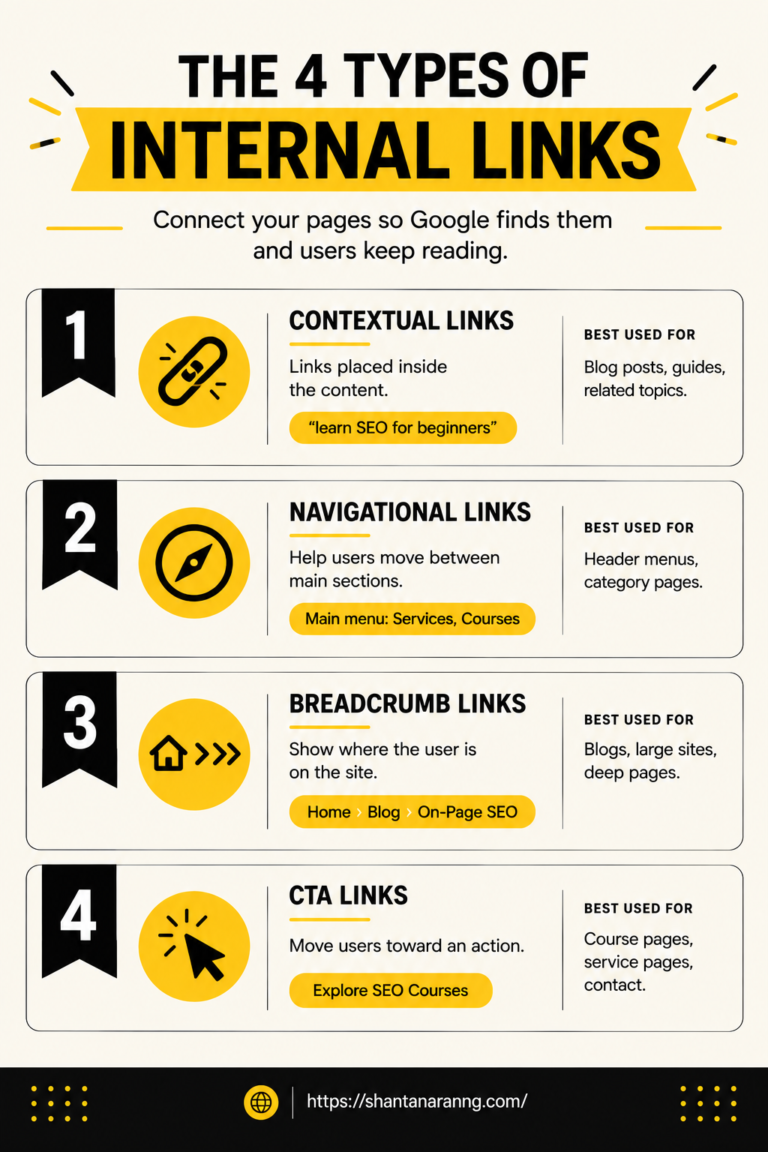
Anchor text is the clickable wording used for a hyperlink. It gives readers and search engines context about the destination page.
Instead of writing:
Click here to learn more.
Use descriptive wording such as:
Learn SEO for beginners
The second tells the reader what they will see, when they click. Good wording is specific, natural, and relevant to the surrounding sentence and the destination page.
A practical approach is to:
- Describe the destination accurately.
- Keep the wording natural rather than forcing exact-match keywords.
- Avoid using the same phrase mechanically across every page.
- Make the linked phrase useful even when read without the surrounding paragraph.
For example, if a page is about keyword research, linking to a full manual on keyword clustering with descriptive text provides a better context than “read more.” Remember that relevance is more important than repetition. A natural variation is often better than forcing one exact phrase over and over again.
Internal Linking in Action: A Real-World Example
Imagine a website that centres around a Learn SEO pillar page. The site can build a structured content ecosystem rather than publishing articles in a vacuum. The pillar page provides a full learning experience and links to cluster pages on keyword research, technical SEO, on-page SEO, content SEO and link building. Each cluster page then links out to more specific sub pages.
For example:
Learn SEO pillar → Keyword Research → Keyword Clustering → Keyword Clustering Techniques
The same structure can work in reverse. A detailed subpage can link back to its broader cluster guide, while the cluster guide links back to the main pillar. This creates multiple pathways through the same topic.
This is also a good example of internal linking in HTML. Each relationship is expressed through standard hyperlinks, but the strategic value is in the placement of those links and the reasons they are useful. This creates a more obvious hierarchy of content. Users can move from beginner concepts to more complex topics and search engines can find out which pages belong to the same topical group.
Start Your Advanced SEO Learning Journey
Move beyond basic concepts with advanced SEO strategies in 2026.
Orphan Pages: The Hidden SEO Problem
An orphan page is a page that has no links from other pages within the website pointing to it. It can be in the sitemap and accessible via its URL, but there’s no obvious internal path to it from the rest of the site.
This is a common orphan pages SEO problem, closely related to the difference between internal links and external links in how site structure is interpreted, because a valuable page can become disconnected from the site’s information architecture. New blog posts, landing pages, product pages, and old resources can all become orphaned if nobody adds links to them.
A simple audit can help:
- Export the site’s indexable URLs.
- Identify pages with zero incoming links.
- Check whether each page deserves to remain indexed.
- Find relevant older or newer pages that can naturally link to it.
- Add contextual links and verify the page is now part of the site’s topic structure.
Do not add links simply to eliminate an orphan status. The destination should be relevant.
Internal Linking Mistakes to Avoid
Good linking depends on quality, relevance, and consistency. Adding hundreds of links without a strategy can create clutter rather than clarity.
Too Many Links on One Page
There is no one ‘perfect’ number of links across all pages. The right amount depends on page length, purpose and user journey. A long form guide will probably need more links than a short landing page.
Problems arise when links are inserted into almost every sentence or when unrelated destinations are added just to increase the site’s link count. Prioritise the pages that genuinely help the reader move forward.
Vague Anchor Text
Phrases like “click here,” “this page” or “learn more” don’t tell you much about where you’re headed. Descriptive copy is generally more useful for SEO and users, but sometimes it works well for accessibility or conversational copy.
When reviewing an internal link, ask one simple question: can someone understand what they will find after clicking it?
Leaving New Content Orphaned
Publishing a new article is not the end of the SEO workflow. Find older pages that are contextually relevant and add links pointing to the new resource after publication. This is particularly important for deeper pages that may not appear in primary navigation. A new URL should become part of the site’s existing content network rather than sitting alone.
Never Linking Back to Older Posts
Older content can be valuable too, particularly if it has gained visibility, backlinks and useful information. When you are publishing a related article, look for older posts that are relevant and deserve a contextual reference.
This two-way approach will strengthen the content network: new pages can link to well-established content, and well-established pages can direct readers to newer content.
Conclusion
Internal linking is one of the few SEO levers that website owners can control directly. You decide which pages connect, what context surrounds each link and how users move through your content. When planned properly, internal links can support crawling, topical relevance, navigation, and authority distribution.
The goal is not to add as many links as possible. Build links that make the site easier to understand and easier to use. Begin with your most important pages, identify orphaned content, correct vague anchor text and establish clear pillar-to-cluster pathways.
Review these connections whenever you publish new content. Done consistently, this process becomes a repeatable part of a stronger SEO system
FAQs on Internal Links in SEO
What is internal linking in SEO?
Internal links are links from one page of your site to another page of your site (same domain).
What is the difference between internal and external links?
Internal links go to other pages on your domain; external links go to other websites entirely.
How many internal links should a page have?
Include two to five relevant links per page based naturally on the content length.
What is anchor text?
Anchor text is the clickable, visible text that hyper-links to another relevant web page.
What are orphan pages?
Orphan pages are web pages on your site that receive zero internal links from anywhere.

 WhatsApp